INFO 1311 - Assignment 3

Glossary Assignment (50 points)

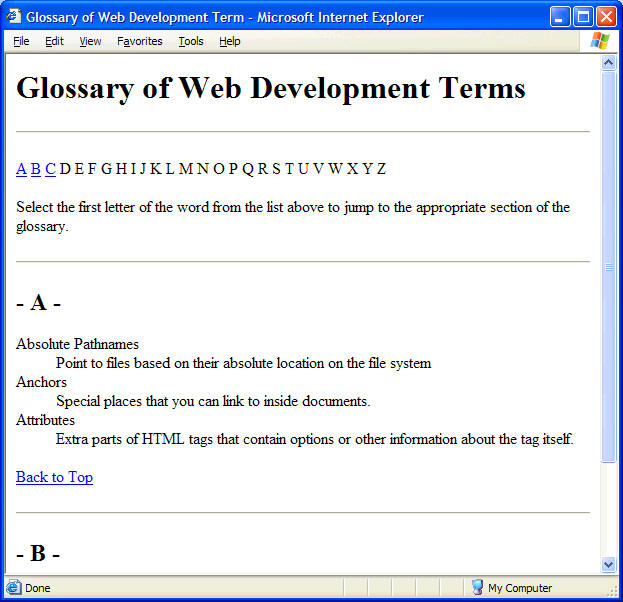
  1. Using a text editor like Notepad or Textpad, create a Glossary of Web Development Terms page using the illustration below as an example.
  2. Name the file glossary.htm and save it in your module3 or week3 folder. Your code must validate as an XHTML 1.0 transitional file. Don't forget to validate your page using the W3C Validator tool.


  1. Your Glossary should contain links to the alphabetical sections within the same document.  You must create a section for each letter of the alphabet even though there isn't a term included in each section. Use each letter of the alphabet in the navigation bar at the top of the page to link to the section of the page that will contain the terms that begin with that letter. Also include a link from each alphabetic section back to the top navigation bar. 
  2. Include the terms listed below and their definitions using a definition list format:
attribute hypertext http
DTD CSS web page
cross-platform absolute pathnames web server
deprecated storyboard web site
html title relative pathnames
protocol markup language xhtml
block-level elements character-level elements logical character styles
physical character styles URL  


  1. Apply the following inline formatting to the page:
  2. Create an external style sheet for your site. Name it info1311.css and link it to default.htm, resource.htm, and glossary.htm. Within the style sheet, define the body's background color (something other than white), font-family, and text color.  Also change the colors for the four anchor states (a:link, a:visited, a:actvie, and a:hover). Make sure the colors you use make the page readable. Be sure to check for cross-platform compatibility. Add additional CSS rules if you want. 
  3. Add a signature at the bottom of the page which will include your name linked to your email address, the special copyright character, and the date the page was created. Use the <address> tag for this signature.
  4. Upload your files (default.htm, resource.htm, glossary.htm and info1311.css)to your student Web site using FTP. Add a link to Assignment 3 on your INFO1311 Home Page. 

    When Finished...

    On-campus Students:  Open your revised INFO1311 Home Page that you uploaded to the server in the browser and test your link to your assignment. Print the code for the assignment page and CSS page and turn them in.

    Online Students: Open your revised INFO1311 Home Page on the server in the browser and test your link to your assignment.