TCP/IP Protocol Stack (Architecture)
Microsoft Model
|
OSI |
TCP/IP |
|
Application
|
Application
FTP, HTTP, Telnet
Standard Language HTML,
MIME
Socket – IP Address, Port |
|
Presentation
|
|
|
Session
|
|
|
Transport
|
Transport –
TCP, UDP
|
|
Network
|
Internet –
IP, ARP
|
|
Data Link
|
Network
Ethernet, Token Ring, FDDI |
|
Physical
|
DOD TCP/IP Protocol Stack
| Application | FTP | SMTP | TELNET | DHCP | WINS | DNS | SNMP |
| Transport | TCP | UDP | |||||
| Internet | ICMP | IP | IGMP | ||||
| Network | ARP | RARP | |||||
Protocol Stack and How it Works
- System Call - request for service to the operating system from an application
- Application Program Interface (API) - although the API typically causes the operating system to take some action, the API can direct the request for server to a remote operating system by using the TCP/IP stack
- API for TCP/IP is called a socket (Windows Sockets, Berkley Sockets)
Sockets
- Socket - an address pair
- IP Address of the computer
- Port
Ports
- Logical connections which carry long term conversations
- Port numbers are assigned by either a client or server process
- Managed by IANA
- Started at 0-255 but are now 0-1023
- Are divided into three ranges:
- Well Known Ports - 0-1023
- Registered Ports - 1024-49151
- Dynamic and/or Private Ports - 49152-65535
- Complete list can be found at:
Port Numbers
Ports are connection points for programs. A program will listen to its assigned port to receive requests or send information back to the client. There are several assigned port numbers however it is vital to know that other numbers can be assigned. Many times ports are changed to increase security for a specific program.
Common Ports
Authentication 113 Kerberos 88 DNS 53 NNTP 119 FTP Control 21 POP3 110 FTP Data 20 SMTP 25 Gopher 70 SNMP 161 HTTP WWW 80 SNMPTRAP 162 IMAP3 220 Telnet 23 TFTP 69
IP Addressing
IP Addresses are unique numbers, for this reason a governing body was needed to assign blocks of address to the masses. InterNIC (Internet Network Information Center) was this body. There are changes being made to start having multiple bodies for registration, information on this can be found when clicking on the InterNIC link above.
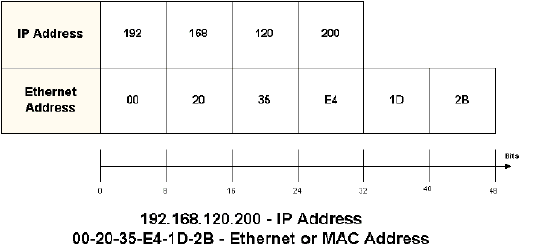
When talking about Ethernet Hardware addresses on the network, we are talking about a 6-byte, 48 -bit address. This address is necessary for the destination device's NIC to recognize and except ethernet frames directed at it. If this recognition doesn't occur, the computer or device discards the frame. TCP/IP requires a second address called the IP Address. The IP Address is a 4-byte, 32-bit address.
Where the hardware address is considered "flat", it only tells you the device, the IP address is considered "structured". The information received through the address contains both the network and device information.
IP Address Classes
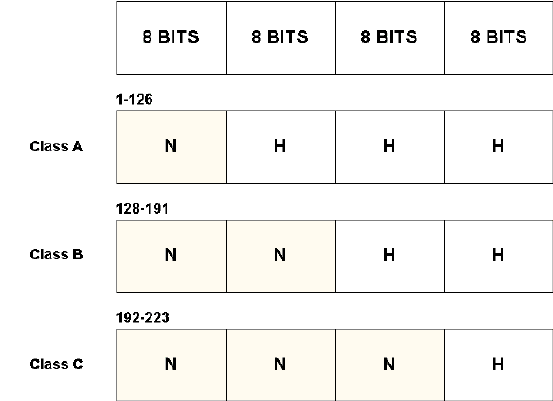
IP Addresses have two parts: the network address and the device address (host). Routers use the network component of the address to select the network interface to which a packet should be routed.
- Individual computers are referred to as hosts (not always servers)
- 0 and 255 are reserved for broadcasts
IP Address used to be broken into 5 classes. These classes were defined by InteNIC, the governing body for IP organization. These classes are labeled A - E. The general user will only be concerened with the first 3 classes of A, B, and C. The D and E networks are held for special licenses. Although InterNIC now uses a CIDR method of assigning IP, the class system is a good way to understand a network's TCP/IP implementation.
Below is the breakdown of the four octets in a classes numbers and what the parts address:
Private IP Addresses
IANA (previously handled by InterNIC) has reserved a series of addresses to be used by private networks, that is, networks not connected to the Internet: These numbers can be used with on any device in your network or WAN including a Proxy Server; BUT the IP sent out into the Internet must be a registered PUBLIC IP. Many companies use private IP in their WAN and use a proxy server as the gateway to the Internet. The private IP is converted at the Proxy server to a public IP.
Class A 10.0.0.0 Class B 172.16.0.0 thru 172.31.0.0
16 Class B LicensesClass C 192.168.0.0 thru 192.168.255.0
256 Class C LicensesClass B 169.254.0.0 - Microsoft Reserved Subnet Masks
IP splits addresses into a host and network component as explained before. A subnet takes over responsibility for delivering packets to a certain range of IP addresses from the IP network it is part of. The network mask can also tell you what class of license your institution has:
License Mask Class A 255.0.0.0 Class B 255.255.0.0 Class C 255..255.255.0 Internally, institutions can consist of several smaller networks or LANs. Since IP Networks cannot be broken up by routers it is sometimes necessary to break up a license into several smaller networks. This is done through the subnet mask. Subnetting, as this process is called, is only an internal division of the network and for that reason is completed by the network owner or administrator. This process is invisible to the outside world.
Assigning IP Numbers
IP Numbers are unique to each machine. There are two ways to assign numbers: static and DHCP (dynamic).
Static
Static IPs are manually input by a technician. In addition to the IP Number, network mask, and gateway must all be set. The down side to statically assigning IP numbers is that any changes must manually done again.
DHCP (Dynamic Host Configuration Protocol)
DHCP involves a server that has a range or scope of IPs available to client workstations requesting them. Workstations then obtain a lease on the number. Along with the IP, DHCP also give the client the DNS, Gateway, and WINS servers.
Routing
General Information
- IP traffic is moved between networks through Routers and Bridges
- A router/bridge can be a device or a server setup with 2 NICs to create one
- The router can be setup to discover paths or can be statically assigned
- Each port Ethernet (ETH) and Serial (S) that are used need to have an IP assigned
- The gateway is the IP Number that is attached to the device that goes out of the network segment to another segment or another completely different LAN
- IP does not work without an IP Gateway
- Routing Table is a database found on the routing device that caches destination-IP information
- Routing Table can be configured manually or use discovery
Troubleshooting TCP/IP
Tracking down the problem
- Internal
- Bound IP Address
- Gateway
- Router
- Server inside the system
- Server outside the system
- Using the name or using the IP
Utilities
- ping - utility used to bounce off the logical connection of an IP Address to a nic card on a computer, usually available on all machines with TCP/IP installed
- winipcfg - GUI utility used in Win95 and Win 98 to verify the TCP/IP setup of your machine, uses switches to view extended info (/all), and to release (/release) and renew (/renew) dynamic IP assignments through DHCP
- ipconfig - same as winipcfg only it is text based only and is available in Win 98, Win NT 4.x and W2K
- ifconfig - similar UNIX command to ipconfig
- nslookup - stands for "name server lookup," it is the command to get the entry from the current machines DNS server
- ARP - stands for "Address Resolution Protocol", this utility is used to resolve IP Addresses to MAC Addresses for delivery in the current network segment
- tracert - stands for "trace route," this utility sends to screen the path through the network or Internet a packet must take to reach a destination